

How to download a late self-employed receipt
Friday, September 30, 2022 by Administrador
On some occasions, it may happen that, at the time of direct debit of our self-employed contribution, we do not have sufficient funds in our bank account. Once the non-payment has been detected, and in order to avoid incurring interest, we must generate the unpaid receipt to settle the debt as soon as possible.
To confirm that the debt has been generated, you must go to the following link: CLICK HERE.
How to obtain the unpaid receipt?
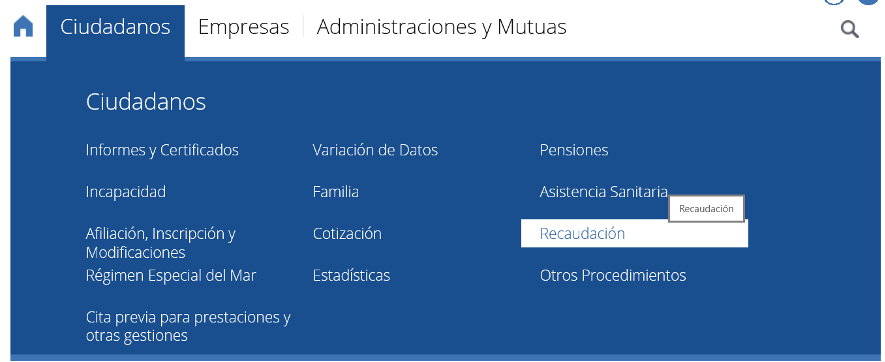
The first step is to access the Electronic Office of the Social Security, using this link: CLICK HERE.
Once on this page, we choose the “Citizens” tab and then “Collection” (Recaudación).
Once accessed, the next option to choose will be “Debt consultation and obtaining payment documents,” and we click on “Obtain access” to enter via Digital Certificate or PIN Key.
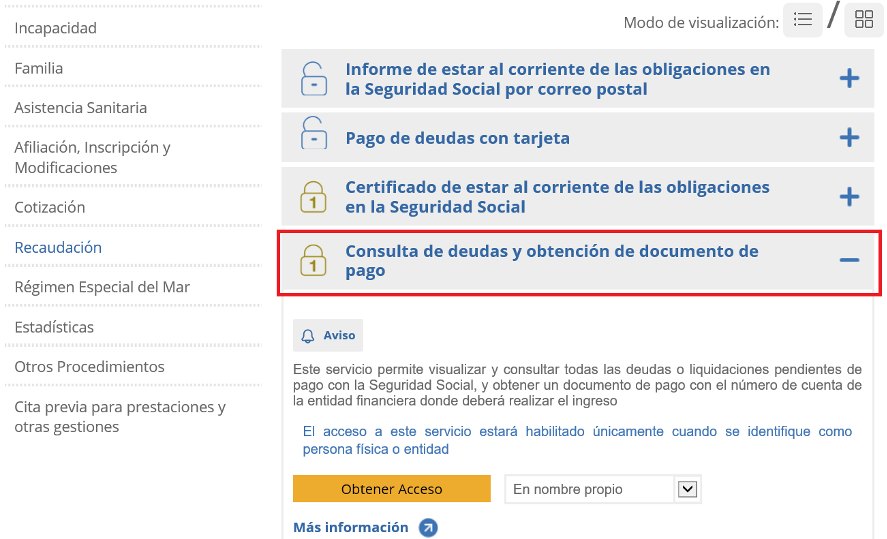
In this way, we will access the process to obtain the payment document, filling in the necessary fields with the required information.
Finally, once the payment document has been generated, you will need to go to a bank office to settle the outstanding debt.
If you are a Nomaspapel client and have any doubts when issuing the outstanding receipt, do not hesitate to contact us. We also offer the option of carrying out these procedures for you. For more information about our telematic service, you can consult us at: https://www.nomaspapel.es/es/contactar